Set requirements by department
Build training and skills requirements around the departments in your business, rather than keeping one undifferentiated list for everyone.

See training requirements and recorded completion together. Give managers a practical view of who needs what, which records are current and where follow-up is needed.
Explore your seven-day trial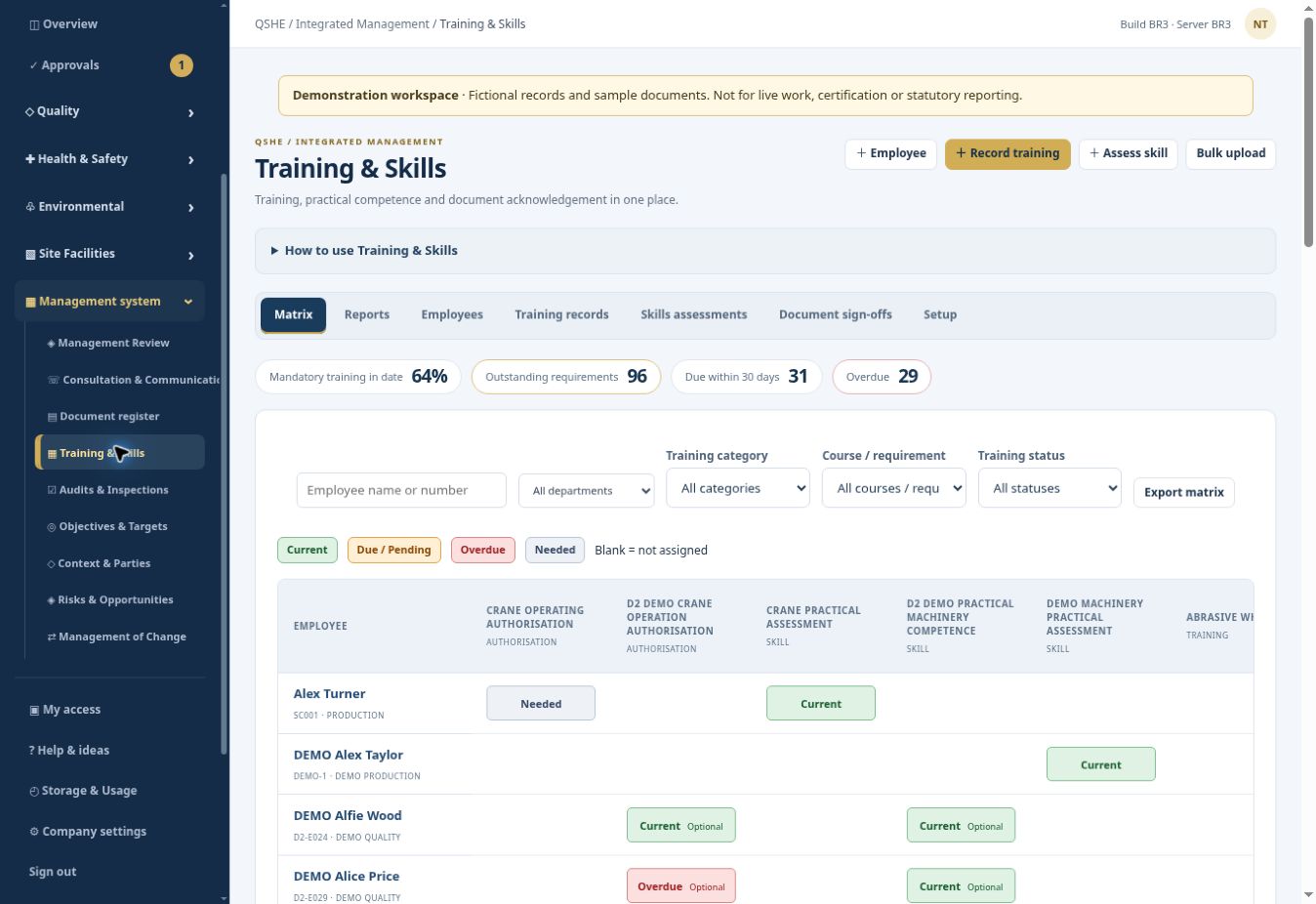
A training spreadsheet can become difficult to maintain when people move departments, certificates expire or several sites use different lists. QSHE keeps training records within the same company and site structure as the rest of your management system. The matrix gives teams a shared starting point for planning training and checking the information held.
Build training and skills requirements around the departments in your business, rather than keeping one undifferentiated list for everyone.
Record training against the relevant employee and keep it connected to their place in the business. Site and department context helps managers review their own teams.
Keep training records and certificate evidence together. Due and overdue information helps identify records that need attention or renewal.
Use the matrix to discuss gaps, upcoming renewals and priorities with managers. A recorded course completion is one part of checking competence, alongside practical experience and supervision.
Training information sits alongside your action register, document register and other QSHE modules. It supports conversations about people and work without maintaining a separate subscription just for a training matrix.
See every QSHE module →Identify the courses or skills required for an employee’s department.
Add the training completed and the relevant dates and evidence.
Check the matrix for gaps, upcoming renewals and overdue records.
Arrange training or a competence review and update the record afterwards.
Explore the workflow with fictional example records before introducing your own live arrangements.
This page describes the training matrix and training-record functions. A built-in e-learning course library is being developed separately; do not assume accredited courses are included or available now.
Yes. QSHE uses a company, site and department structure. The subscription includes the first site, with additional sites available under the published pricing.
No. Training records help inform your assessment. The employer must still consider the task, practical ability, experience, supervision and any further checks needed.
£99 per month or £999 per year for the company and first site. Additional sites: £20 per month or £199 per year. Includes 10 GB shared company storage. Paid subscriptions have a 12-month term; choose monthly or annual billing.
The seven-day trial uses fictional example data and starts when the workspace is ready. Applications may need an eligibility review. No automatic billing.
Bring observations, corrective actions and improvement work into one shared register. Give people a clear owner, a meaningful deadline and a record of what happened next.
QSHE SOFTWAREKeep contractor company information, worker details and supporting documents in one place. Give your team a clearer basis for reviewing who is attending and what has been supplied.
QSHE SOFTWAREKeep the non-conformance, supplier response and internal review in one connected workflow. Reduce the need to reconstruct the history from separate email conversations.